How to Automate Takeoffs from PDF Plans for Accurate Construction Data

kamai.io
May 16, 2026
6 Min

Learn how to automate takeoffs from PDF plans for faster and more accurate construction estimating. Discover how Kamai transforms blueprints into structured quantity data using AI-powered takeoff technology.
Construction estimating has evolved significantly over the past decade. What once depended entirely on printed blueprints, scale rulers, calculators, and spreadsheets is now becoming faster, more intelligent, and far more accurate through automation. One of the biggest advancements driving this transformation is automated PDF takeoff technology.
In modern construction estimating, a PDF plan takeoff is the process of measuring and quantifying project elements directly from digital drawings. Instead of manually reviewing paper plans and calculating dimensions by hand, estimators can now upload PDF blueprints into intelligent software that extracts quantities automatically.
For contractors, estimators, project managers, and developers, this shift is helping eliminate repetitive manual work while improving the accuracy of construction data. As projects become more complex and timelines become tighter, automated takeoffs are quickly becoming an essential part of competitive construction workflows.
The Challenge with Manual PDF Takeoffs
Traditional takeoff methods are slow and highly dependent on manual interpretation. Estimators often spend hours measuring walls, counting fixtures, calculating flooring areas, and transferring quantities into spreadsheets. Even experienced professionals can make mistakes when working across hundreds of drawing sheets.
A small error during takeoff can lead to serious project issues later, including:
- Material shortages
- Budget overruns
- Incorrect bids
- Scheduling delays
- Procurement problems
- Reduced profitability
Manual workflows also make it difficult to scale operations. As bid opportunities increase, estimating teams can quickly become overwhelmed by repetitive measurement tasks.
This is why construction companies are increasingly looking toward automated PDF takeoff solutions.
What Does Automated PDF Takeoff Mean?
Automated PDF takeoff uses AI and computer vision technology to analyze digital construction drawings and convert them into structured quantity data. Instead of manually measuring every element on a plan, the system automatically identifies dimensions, areas, materials, symbols, and quantities directly from uploaded PDFs.
The process is designed to simplify preconstruction workflows and improve estimating efficiency.
Modern takeoff automation can extract:
- Wall lengths
- Floor areas
- Ceiling quantities
- Concrete volumes
- Door and window counts
- MEP fixture quantities
- Pipe and duct lengths
- Room dimensions
- Material quantities
This information becomes immediately usable for estimating, budgeting, procurement, scheduling, and reporting.
Turning Construction Blueprint Chaos Into Structured Data
One of the biggest challenges in construction is that valuable information remains trapped inside static documents. PDF drawings may contain everything needed to estimate a project accurately, but extracting that information manually takes significant time and effort.
Kamai helps solve this problem by transforming construction blueprint chaos into structured digital intelligence.
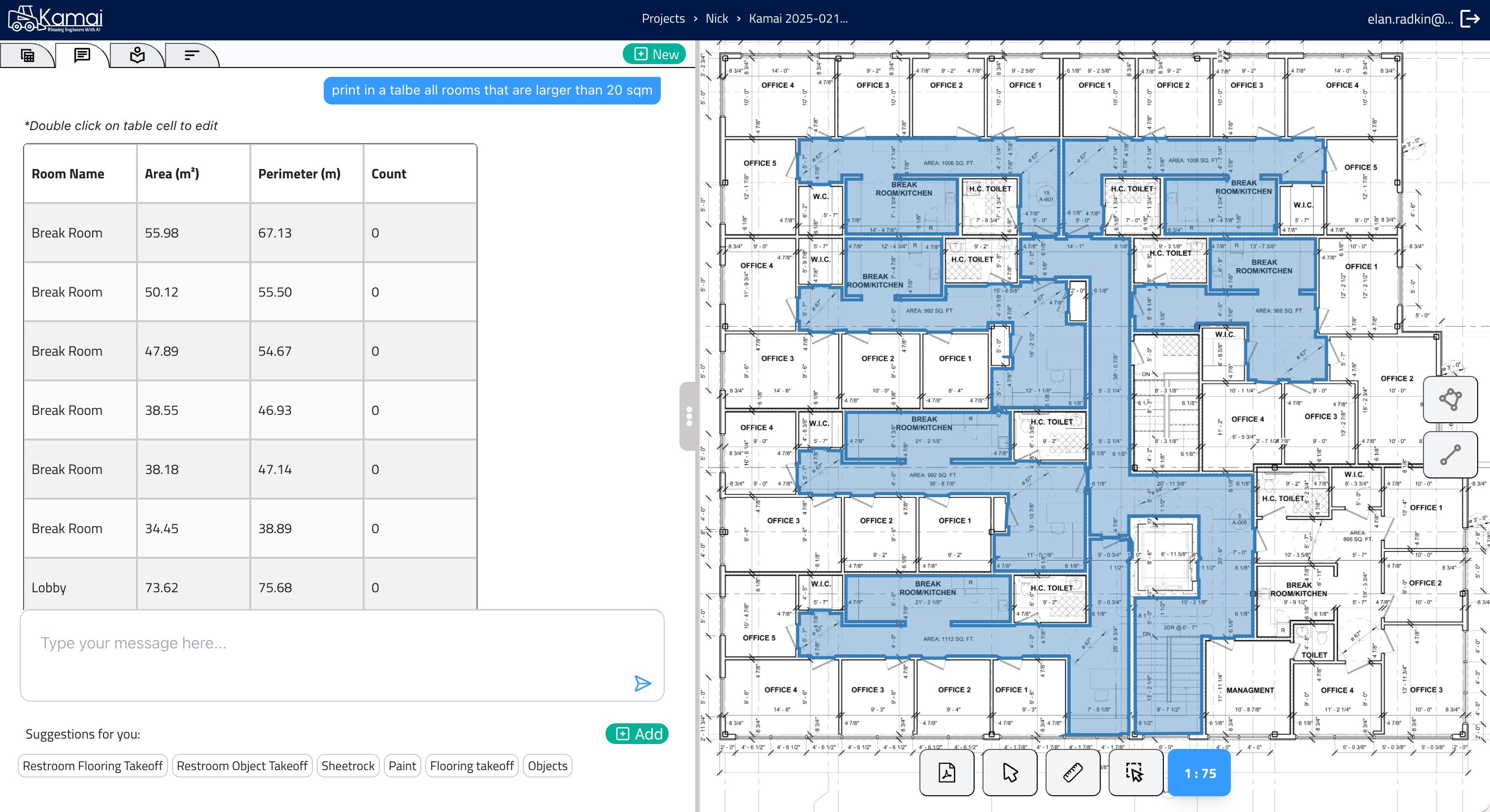
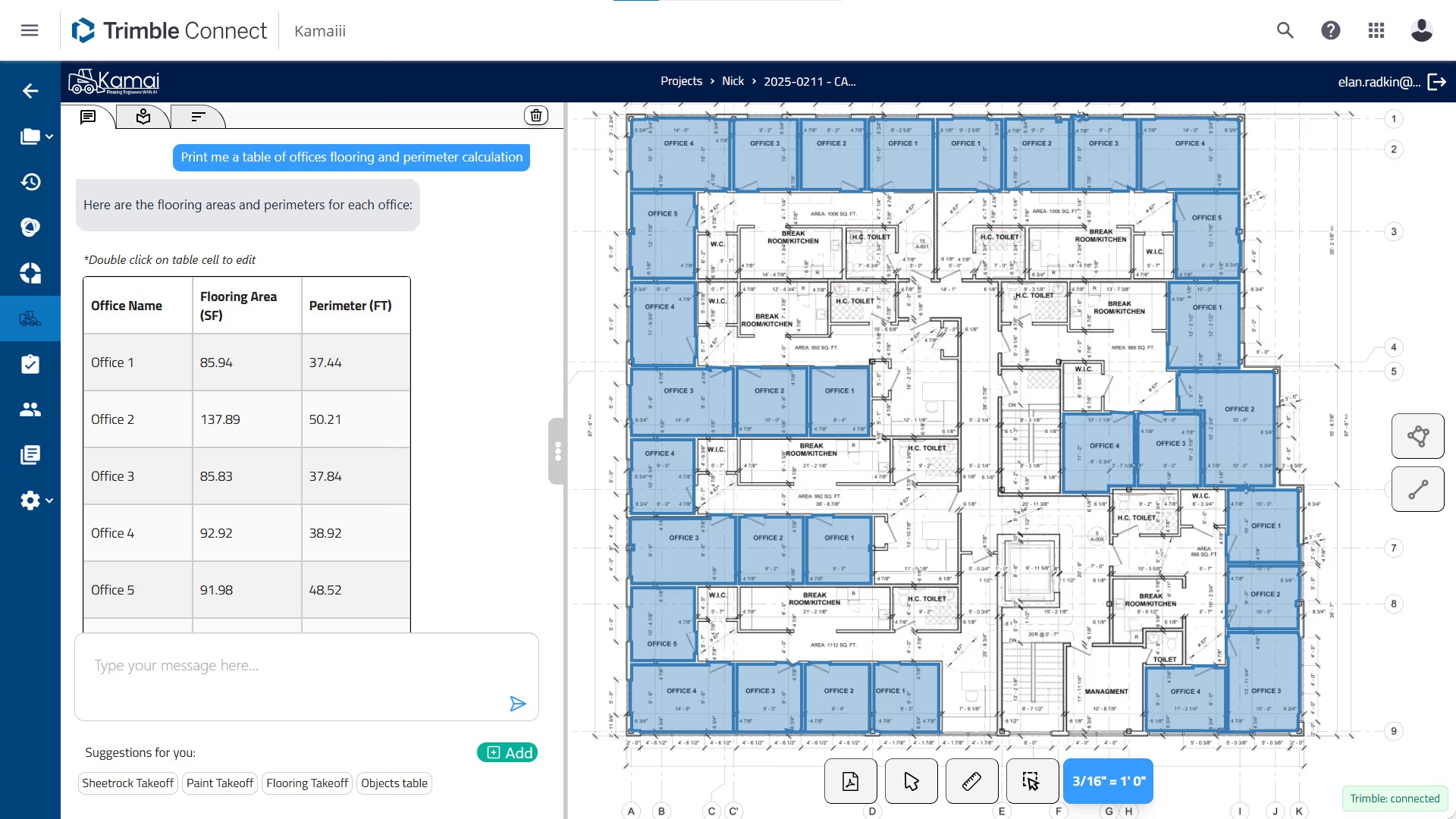
Users simply upload their PDF plans, and Kamai handles the heavy lifting automatically. The platform instantly detects areas, volumes, materials, and quantities with high accuracy, eliminating the need for manual measuring or second guessing.
Instead of spending hours reviewing drawings manually, construction teams can access structured project data within minutes.
Skip Manual Measurements
Manual measuring has always been one of the most time-consuming parts of estimating. Estimators traditionally rely on scale tools and repetitive calculations to determine dimensions and quantities from plans.
Kamai eliminates this process through AI-powered automation.
The platform automatically extracts measurements and quantities directly from uploaded blueprints, helping teams work faster while reducing the risk of human error. This allows estimators to focus more on project analysis and pricing instead of repetitive measuring tasks.
For companies handling large bid volumes, this creates a major operational advantage.
Analyze Drawings Instantly
Modern construction projects involve massive amounts of drawing data across multiple disciplines. Reviewing every architectural, structural, and MEP sheet manually can take days.
Kamai accelerates this process by analyzing plans instantly after upload. The AI identifies project elements, quantities, materials, and layouts within seconds.
This rapid analysis helps teams:
- Prepare estimates faster
- Validate project scope
- Identify material requirements early
- Improve bid turnaround times
- Reduce estimating bottlenecks
Faster analysis also means companies can respond more quickly to changing project documents and revisions.
Make Better Construction Decisions
The real value of automated takeoffs goes beyond measurement speed. Structured construction data helps teams make smarter decisions throughout the project lifecycle.
Once quantities are extracted from PDF plans, teams can use the information to:
- Compare material costs
- Forecast budgets
- Improve procurement planning
- Evaluate project feasibility
- Reduce waste
- Analyze alternative options
- Improve scheduling accuracy
Kamai transforms blueprint information into actionable project intelligence, helping contractors and estimators plan with greater confidence.
Why PDF Takeoffs Are Still Critical in Construction
Even as BIM adoption continues to grow, most construction workflows still depend heavily on 2D PDF drawings. Many projects begin with tender documents, scanned plans, or early-stage design PDFs long before full models are available.
PDF plans remain critical because they are:
- Universally accessible
- Easy to distribute
- Common during bidding phases
- Required for documentation and validation
- Widely used across all construction disciplines
Automating takeoffs from PDF plans allows companies to modernize workflows without abandoning the documents they already rely on daily.
How Automated Takeoffs Improve Estimating Accuracy
Accurate estimates depend on reliable quantity data. When quantities are inconsistent or incomplete, projects become vulnerable to cost overruns and scope issues.
Automated takeoff systems improve accuracy by standardizing the measurement process. AI-powered extraction reduces the variability that often occurs between manual estimators.
This leads to:
- More consistent bids
- Better material forecasting
- Reduced rework
- Improved project profitability
- Greater confidence in estimates
For contractors operating on tight margins, even small improvements in estimating accuracy can have a major financial impact.
Integration with Modern Construction Workflows
Another major advantage of automated takeoff systems is their ability to integrate with existing estimating and construction platforms.
Structured data extracted from PDF plans can be connected directly to:
- Estimating software
- Procurement systems
- ERP platforms
- Project management tools
- Cost databases
- Scheduling systems
This eliminates duplicate data entry and creates smoother digital workflows from blueprint to final estimate.
Instead of manually transferring quantities between applications, teams can automate the flow of construction data across systems.
The Future of Construction Estimating
Construction estimating is becoming increasingly data-driven. Companies that continue relying entirely on manual takeoffs may struggle to keep pace with growing project complexity and competitive bidding environments.
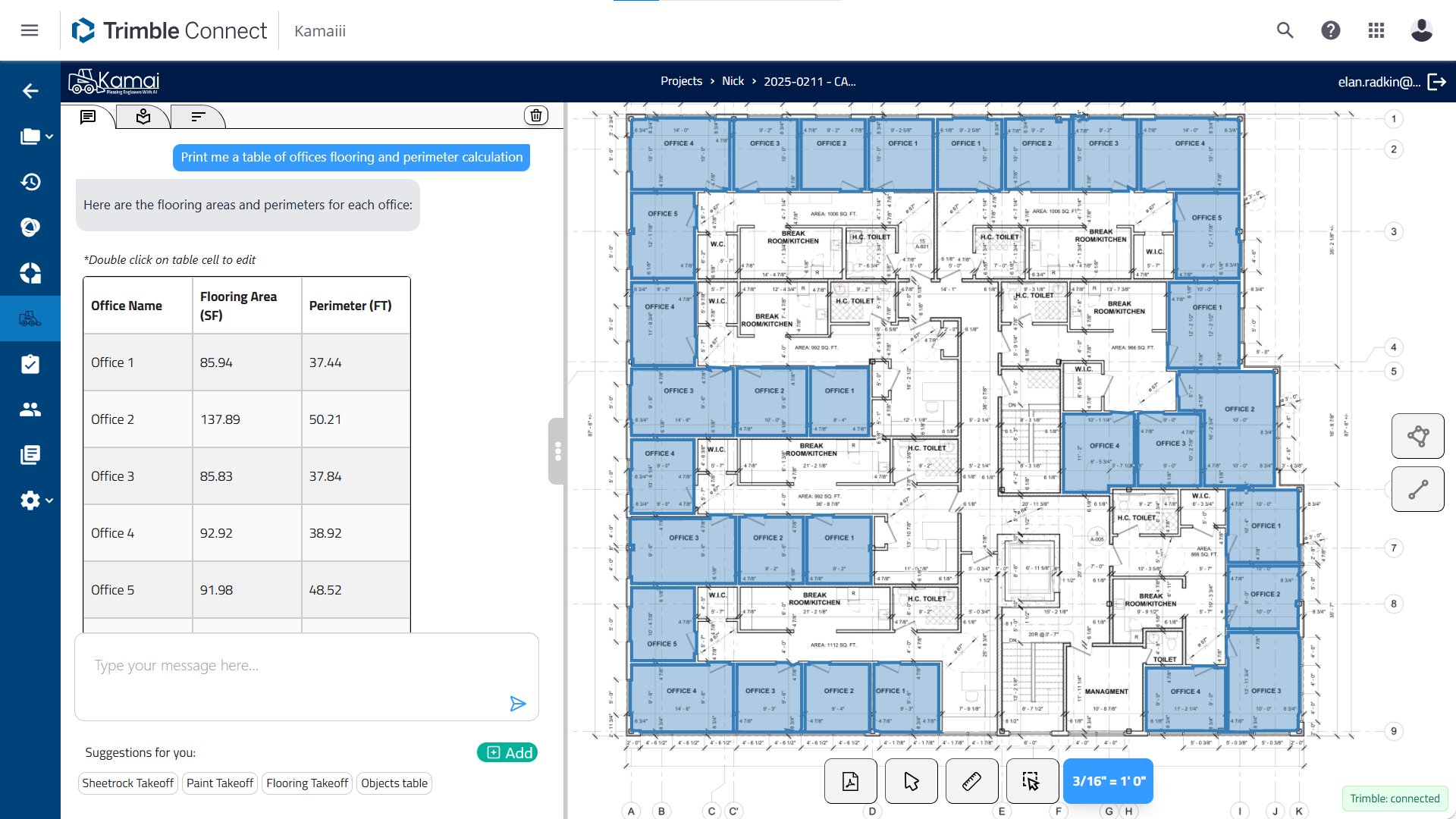
Automation is helping construction professionals move from slow, document-heavy workflows toward intelligent digital operations.
AI-powered PDF takeoff systems are no longer experimental tools. They are becoming practical solutions for everyday estimating challenges.
As technology continues to improve, automated takeoff platforms will deliver even greater capabilities, including:
- Advanced room recognition
- Intelligent material classification
- Real-time quantity validation
- Multi-sheet project analysis
- Conversational data queries
- Predictive estimating insights
The goal is not to replace estimators, but to give them better tools for making faster and more informed decisions.
Conclusion
Automating takeoffs from PDF plans is transforming how construction teams handle estimating and preconstruction workflows. By replacing slow manual measurements with AI-powered quantity extraction, companies can improve accuracy, accelerate bidding, and reduce repetitive work.
Kamai helps contractors and estimators turn static blueprints into structured construction data quickly and efficiently. With automated quantity extraction, instant drawing analysis, and intelligent construction insights, teams can focus less on measuring plans and more on delivering profitable projects.